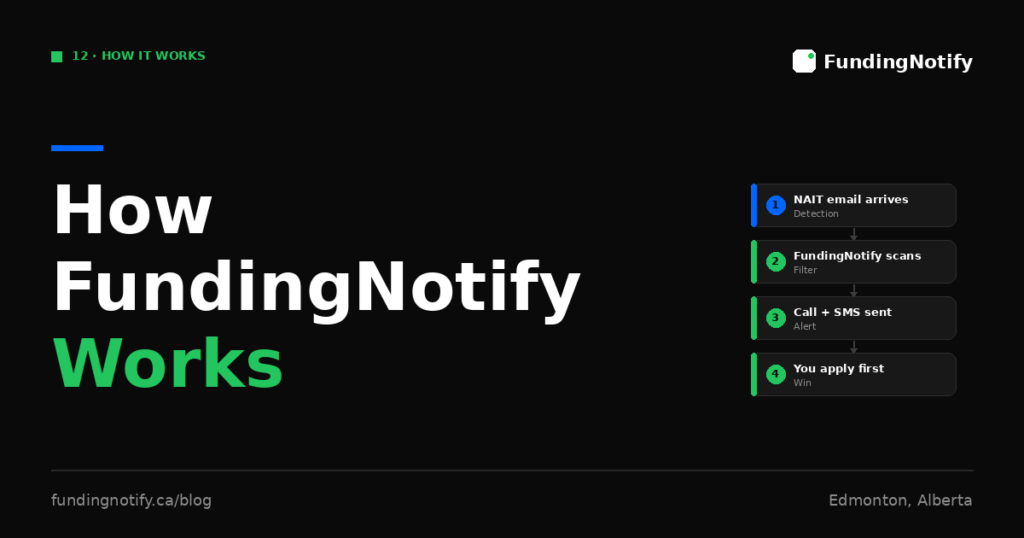
If you are a NAIT ESL or Academic Upgrading student waiting for FLA funding, FundingNotify exists to solve one specific problem: you need to know about the funding window within minutes of it opening — not hours later.
This article explains exactly how the service works, from signup to the moment your phone rings.
The Problem FundingNotify Was Built to Solve
NAIT sends the FLA funding invitation email to all eligible registered students at once. When that email arrives, the clock starts. Based on real session data:
- The funding window is open for approximately 48 hours
- All available spots are typically claimed within 6 hours
- There are 3 sessions per year — Fall, Winter, and Spring
The challenge is that the invitation email arrives in English, without advance warning, on a regular business day. For NAIT ESL students — many of whom are newcomers whose first language is not English — this email can go unnoticed for hours. By the time it is seen and understood, the funding may already be gone.
FundingNotify monitors the email on your behalf and alerts you the moment it arrives — with a phone call, not just a notification.
How It Works — Three Steps
Step 1 — Sign up in 30 seconds
Go to fundingnotify.ca. Provide your name and phone number. Complete your payment via Stripe. Your account is activated immediately.
After signup, you receive a video guide that walks you through the Gmail setup step.
Step 2 — Set up Gmail in 2 minutes — done once, automatic forever
This is the only technical step, and it takes 2 minutes. You set up one Gmail forwarding rule:
- From:
@nait.ca - Forward to:
monitoring@fundingnotify.ca
This tells Gmail to automatically send a copy of every email from any @nait.ca address to FundingNotify. The video guide included after signup shows you exactly how to do this, step by step.
Once this rule is set up, you never need to touch it again. It runs automatically in the background, for every session — Fall, Winter, and Spring — until you manually delete it.
Step 3 — Relax. FundingNotify handles the rest.
From this point, FundingNotify monitors the forwarded emails. When the NAIT Foundational Learning funding email arrives in your Gmail inbox, it is automatically forwarded to FundingNotify, which detects it immediately.
What Happens When the Funding Window Opens
The moment FundingNotify detects the NAIT funding email:
Your phone rings. A call is placed to the number you provided during signup. This is not a silent push notification — it is an actual phone call that rings your device and demands attention, even if your phone is on silent in your pocket.
You receive an SMS with the direct link. The text message contains the direct link to the NAIT FLA application form. One tap and you are on the application page — without needing to find the email, read it in English, or navigate to a website.
If you do not answer the first call, a second reminder call fires automatically 5 minutes later. You get two chances to be alerted before the window moves on.
The Key Features
Automated phone call Your phone rings — it is impossible to miss the way a silent notification can be ignored. If you are in class, at work, or in a noisy environment, the call still demands your attention.
Multilingual detection FundingNotify identifies the funding email even if you do not read English fluently. You do not need to understand the full content of the email — the service detects it and alerts you so you can act.
SMS with direct link The NAIT application form link is in the SMS. One tap and you are applying — before most of your classmates have even opened Gmail.
Zero maintenance setup One Gmail forwarding rule. Set up once. Works automatically for every session forever.
Refund guarantee If your phone does not ring when funding opens — if FundingNotify misses the alert — you receive a full refund. No questions asked.
What FundingNotify Does Not Do
Being honest about what the service does not do is important:
FundingNotify does not apply for funding on your behalf. It alerts you the moment the window opens. You still need to click the link and complete the application yourself — which takes a few minutes.
FundingNotify does not guarantee you will receive FLA funding. It gives you the fastest possible start — but the Government of Alberta’s eligibility assessment and the availability of funds determines the outcome.
FundingNotify is not affiliated with NAIT. It is an independent service. NAIT does not endorse, partner with, or have any relationship with FundingNotify. All funding decisions are made entirely by the Government of Alberta.
Is My Gmail Safe?
This is a common and important question.
The Gmail forwarding rule you set up only forwards emails from @nait.ca addresses — nothing else. Your personal emails, other subscriptions, social media notifications, and any other content in your inbox are never forwarded to FundingNotify.
FundingNotify receives only copies of emails sent from NAIT addresses. It cannot read, access, or interact with any other part of your Gmail account.
The Gmail forwarding feature is a standard, Google-supported function. It does not give FundingNotify any access to your account — it simply delivers copies of matched emails to a designated address.
How Long Does the Service Last?
FundingNotify is a per-session service. Each payment covers monitoring until your phone rings — meaning until FundingNotify detects the funding email and alerts you.
The Gmail forwarding rule, once set up, continues running permanently until you manually delete it. This means for future sessions, the technical setup is already in place — only your FundingNotify subscription needs to be renewed.
Why Not Just Enable Gmail Notifications Yourself?
This is the most common question from students who wonder if they really need FundingNotify.
Gmail push notifications have two limitations:
1. They depend on you seeing and acting on the notification immediately. If your phone is on silent, if you are in class, if you are asleep, or if the notification gets buried under other alerts — you will not respond in time. A phone call is different. It demands attention in a way a notification does not.
2. Gmail may not deliver the notification instantly. Gmail’s notification system has variable delays. A phone call placed by FundingNotify is triggered the moment the email is detected — not after a delay.
For a funding window where all spots can be gone in 6 hours, the difference between a notification you see an hour later and a phone call that rings immediately is the difference between getting funded and not.
Who Built FundingNotify?
FundingNotify was founded by Franklin Tchakoute Ngongang, a francophone ESL student at NAIT originally from Cameroon. He observed firsthand that many of his classmates — eligible students who had done everything right — missed the funding because the invitation email arrived in English with no warning, and they did not recognize its urgency in time.
As he describes it:
“My ESL classmates and I saw too many people miss their funding because the email arrives in the middle of the day, in English, with no warning. We built FundingNotify so that no student loses a session of classes because of a missed email.”
The service is designed and operated in Edmonton, Alberta — by someone who understands the NAIT ESL experience from the inside.
Activate Your Alert
FundingNotify is active for the Spring 2026 session. The funding email could arrive at any time.
The setup takes 2 minutes. The video guide walks you through every step. The refund guarantee means there is no risk if the alert does not fire.
👉 Activate your alert at fundingnotify.ca
FundingNotify is not affiliated with NAIT or the Government of Alberta. It is an independent service designed and operated in Edmonton, Alberta.
Source: fundingnotify.ca. Last updated: May 2026.
Ne manque plus jamais ton funding NAIT Never miss your NAIT funding again
SMS + appel automatique dès l'ouverture du funding. 30 $ pour toute la session. SMS + automatic call when funding opens. $30 for the entire session.
Activer mon alerte — 30 $ Activate my alert — $30Articles similaires Related articles
If you did not finish high school, or if your high school grades are not strong enough to enter the NAIT program you want, Academic…

The Foundational Learning Assistance program has existed in Alberta for decades. For most of that time, it was a stable, predictable source of support for…

The numbers around NAIT’s FLA funding — 48 hours, 6 hours, 3 sessions per year — are easy to read but hard to feel. What…